
Your home inventory as a PDF, ready when someone asks for a list
Sooner or later someone asks for a list of what you own. It's the insurance adjuster after a burst pipe, the landlord at move-out, the moving company quoting the job, or your family going through your papers one day. They rarely want to install an app to read it. They want a document.
HomeHero can now make one. The inventory report turns your inventory, or any part of it, into a PDF with a photo of each item next to its details, grouped by room. It's on every plan, including Free. It's made on your device and works offline.
Choose what goes in
A claim for a flooded basement doesn't need your bookshelf, and a move-out inspection doesn't need the things in storage. So the report starts with picking.
On the left is your location tree. Tick a location and everything inside it comes along: tick Kitchen and you get the pantry shelves too. Untick a single shelf and the rest of the room stays. If you untick House and then tick House › Kitchen, you get only the kitchen, because the closest choice wins. A half-filled box means part of what's inside is in.
On the right is the list of items. Untick one to leave it out. To bring in something from another room, search the whole inventory and tick it. These choices stick when you change locations, and the list marks them Added or Removed, so it's clear why a room shows as partly selected.
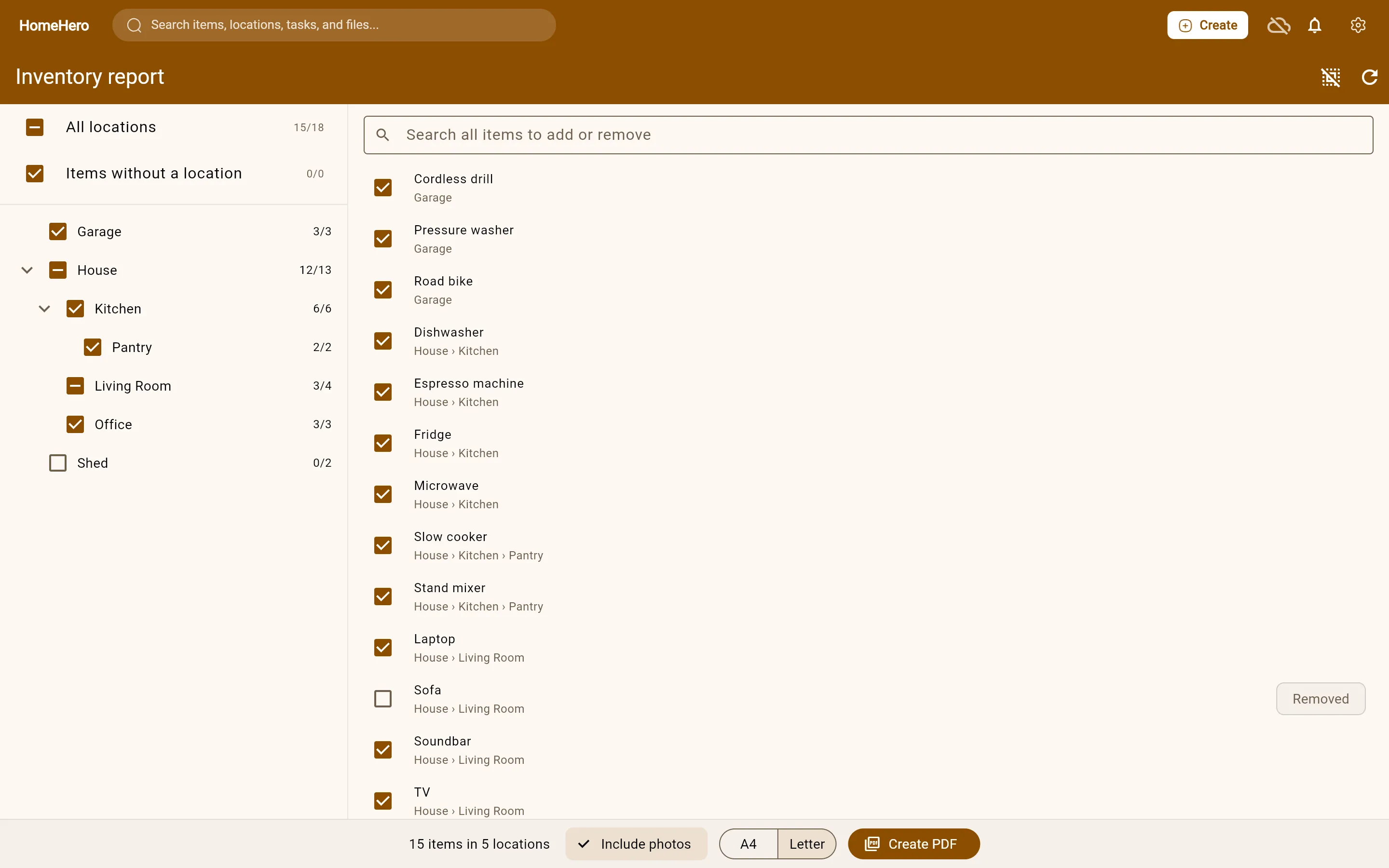
Then pick A4 or Letter, decide whether to include photos, and press Create PDF. On Android and Linux you choose where to save it. In the web app it downloads.
What's on each page
The first page sums up the report: the property, the date, and how many items are in each location. After that, every location starts on a fresh page with its full path, such as House › Kitchen › Pantry.
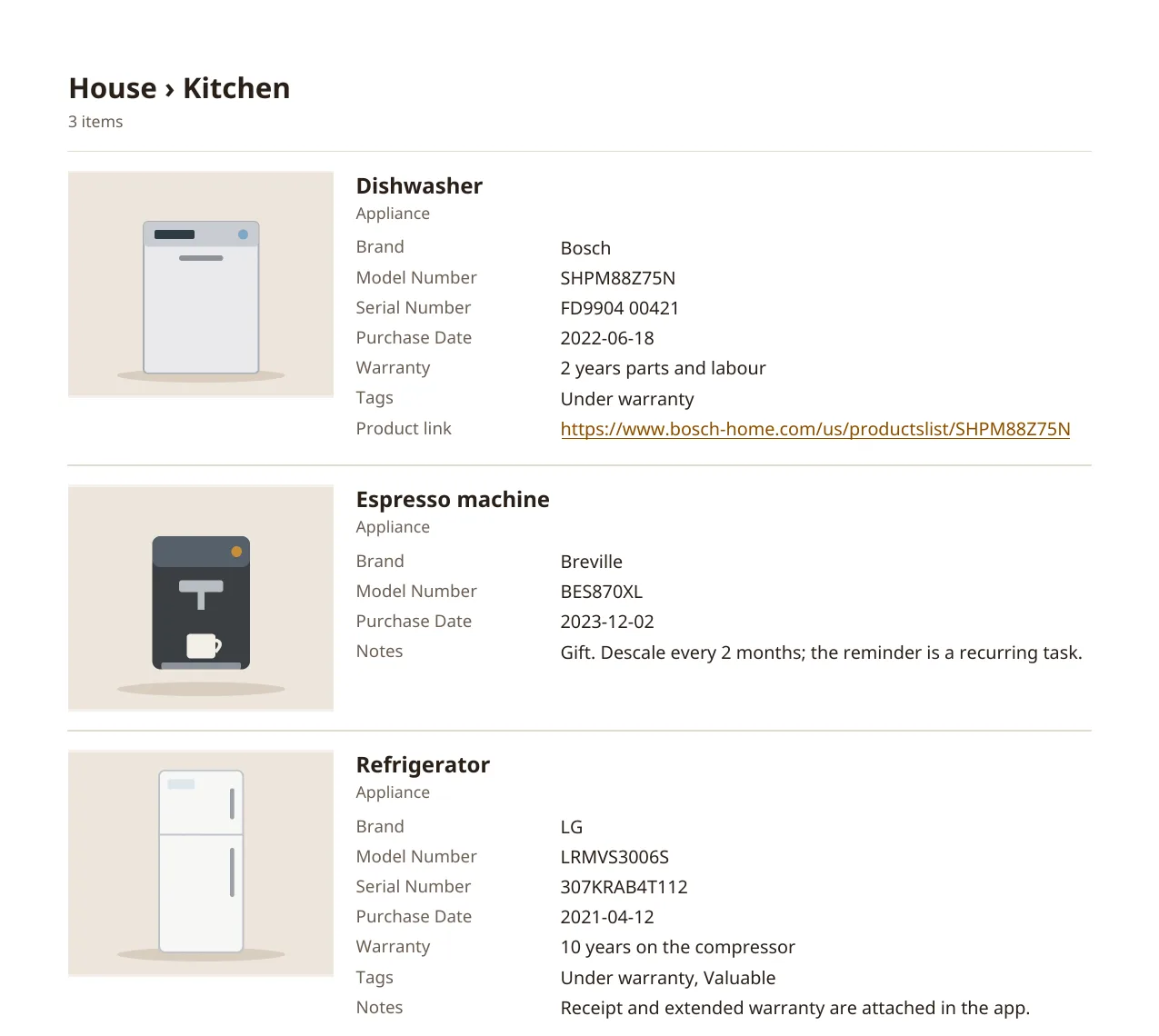
Each item gets a block. The main photo sits on the left. On the right are the name, the item type, your own fields (model number, serial number, purchase date, warranty, whatever you set up), tags, the product link and your notes. If a note runs long, it carries on below the item, onto the next page if it has to. It's never cut off.
This is where the dull part of keeping an inventory pays off. A report is only as useful as what went into it, and the fields you filled in months ago are exactly what an adjuster asks for.
About the photos
HomeHero uses the photos saved on your device first. If you're signed in, photos that are only on our servers are downloaded for the report. They're scaled down to keep the file small, and their metadata, including the location where the photo was taken, is removed.
Some photos can't be used. HEIC files from some phones are one example. Those items show "Photo unavailable", and the summary page says how many there were, so a missing photo doesn't go unnoticed.
Make one now, not after
A report you make the week of a fire has to come from a phone that may be gone. A report you made last month is already in your email. The Insurance Bureau of Canada's advice to tenants is to keep a list of everything you own and update it regularly. A PDF in your email or cloud storage is an easy way to do both.
A routine that works: make a full report once, save it somewhere off the premises, and make a new one after a big purchase or once or twice a year. A recurring task in HomeHero can remind you.
What it doesn't do
- It doesn't add up values. HomeHero has no built-in price field, and amounts typed into your own fields can't be totalled reliably across currencies and formats.
- It's a record, not an appraisal or a legal document. Your insurer decides what counts as proof.
- The PDF uses Latin, Greek and Cyrillic letters. Emoji, and Chinese or Japanese text, won't show in it.
- Attached files, like the PDF manual or the receipt, aren't copied into the report. Their items are, with the photo and details.
The report is in the app now: Settings → Inventory report, or the PDF button on any location's page. There's more detail in the docs.
Sources
- Insurance Bureau of Canada, Tenant's insurance: the back-to-school essential most students forget