
What's new in HomeHero: a bigger Browse and less typing
If you last opened HomeHero in the spring, it will look different. Most of this year's work went into two things: making a big inventory pleasant to browse on a laptop, and cutting down how much you have to type to get things into it. Along the way we fixed a long list of smaller annoyances.
Here's what changed.
Browse, rebuilt for big screens
On a wide window, Browse now looks like a desk tool rather than a stretched phone app. Your locations sit in a rail on the left. Items, locations, tasks, images and files each get a tab, and items are grouped by the room they're in.
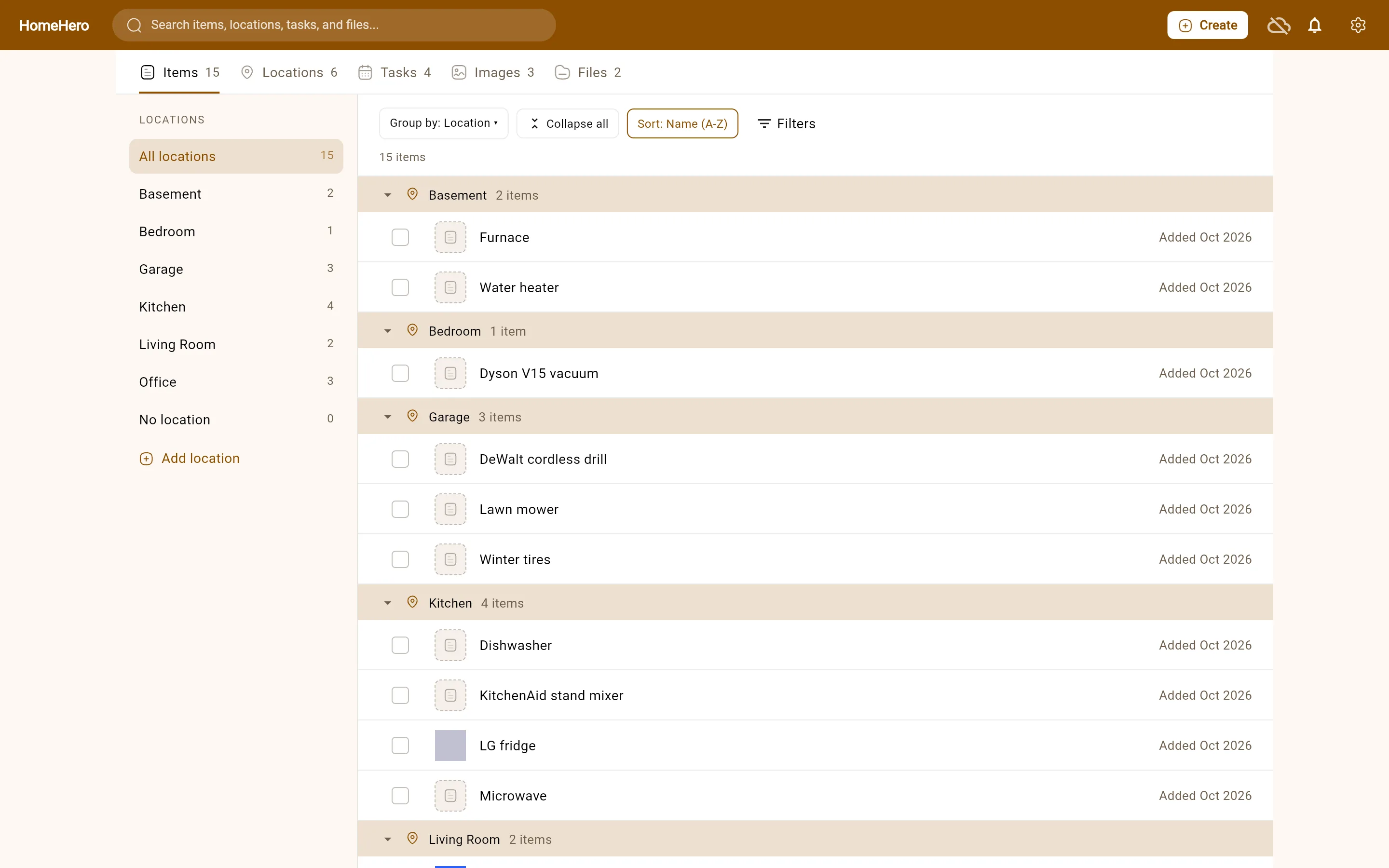
Click the garage in the rail and you see what's in the garage, including the shelf and the bins inside it. The count tells you how many things are in the garage itself and how many are in its sublocations. Add an item while you're there and it starts out in the garage.
A few other things came with it:
- Groups fold. HomeHero remembers which ones you folded, and very large groups start folded, so a full garage doesn't push everything else off the screen.
- You can sort by name, newest or recently used, or turn grouping off.
- Tick several items and move them together, or drag a row onto a location.
- Filters for items with no location and items with a task help you find the stragglers.
On a phone, Browse keeps the layout you know, with search staying in the header.
Less typing, if you want it
Typing in a whole house is where most home inventories stall. Premium now has three ways to get help with that, and in each one you see the draft before anything is saved.
Several items from one photo
Photograph a shelf or a desk and HomeHero picks out the separate things in it, usually up to five, with a cropped thumbnail and a drafted name and details for each. A hint like "camping gear" helps. If one item comes out wrong, you can add a note and rerun just that one.
An item from a product link
Paste the shop or manufacturer page for something you bought, and HomeHero drafts the item from what the page lists: name, brand, model, specs and a picture, matched to your item type's fields. Some shops block this. When that happens, HomeHero says so and you add the item by hand.
Smart autofill
Already added an item with a photo? Tap Populate in the editor and HomeHero suggests tags and fills in the details that are still empty, including your own fields. It leaves anything you typed alone.
A product link on every item
Items also have a product link field now. A link import fills it in for you, and you can paste one in yourself on any plan, so the manual or the replacement part is one tap away later.
AI gets model numbers wrong sometimes, so give drafts a quick read. It also leaves the price you paid, the purchase date and the serial number for you to enter, because a product page can't know those. More on how the AI features work.
Smaller things you might notice
- When you pick a location for an item and the one you want doesn't exist yet, you can create it right there.
- A file or image page lists the items it's attached to, so a receipt leads you back to the thing you bought.
- With Sync, if you change the same field on two devices before they catch up, HomeHero shows both values side by side and lets you pick one.
- Task colours are calmer. Only high-priority and overdue tasks stand out now, so the ones that need you are easier to spot.
- Cropping a photo on Android works properly: the crop frame resizes the way you'd expect.
- The app opens from what's on your device before it talks to our servers, so a slow connection no longer holds up the start.
- The web app's Remember me option keeps you signed in between visits.
What it costs
The free plan is the same as before. It has no item limit, needs no account and keeps everything on your device. Sync is $2 a month and keeps one inventory on all your devices. Premium is $5 a month and adds the AI features above on top of Sync. The pricing page has the details.
Update — November 11, 2026: HomeHero is now available for iPhone and iPad on the App Store (iOS 16 or later). The free inventory works offline on your device without an account. Sync and Premium AI are optional paid plans that need an internet connection. This note reflects availability now; the rest of this October post is unchanged.
What isn't here yet
At the time this post was published, there was no iOS app. The web app works in Safari on an iPhone or iPad in the meantime. Reading text from receipts and labels, and spotting duplicate items, are on our list but not built, so we don't advertise them. The features page keeps a list of what HomeHero can't do yet.
If you've been waiting on something, or something here doesn't work the way we've described it, tell us.